- Integrations
- Automation and workflows
- Internal tools
- Supporting business logic

If you’re running Adobe Commerce, customization is unavoidable.
You add integrations. You automate processes. You build workflows to support how your business actually runs. Most teams start by putting all of this directly into Adobe Commerce, because it’s the quickest way to move forward.
That approach works… for a while.
Over time, the platform gets heavier. Upgrades start to feel risky. Even small changes take longer than they should. That’s usually when teams realize they need a cleaner way to extend Adobe Commerce without constantly touching the core.
That’s where Adobe App Builder comes in.
Adobe App Builder gives you a way to build custom functionality around Adobe Commerce instead of inside it.
Rather than pushing every integration, automation, or workflow into Magento modules, App Builder lets that logic live separately while still connecting tightly to Adobe Commerce through APIs and events.
In practice, it becomes the place for:
For teams delivering adobe commerce development services, this separation is what keeps Adobe Commerce stable as the business grows.
Most teams don’t adopt App Builder because it’s trendy. They adopt it because something has become painful.
Usually it’s one or more of these:
App Builder helps by moving the “extra work” out of the core platform. When that happens, Adobe Commerce becomes easier to upgrade, easier to manage, and easier to trust.
A cleaner Adobe Commerce setup often starts with the right migration plan. Our guide on Magento 1 to Magento 2 Migration Cost in 2026 gives a practical breakdown of the budget areas involved in moving from an older Magento store to a more scalable commerce foundation.
App Builder works best when the work does not need to happen during a live storefront request.
Common fits include:
This is often what people really mean when they search for a magento app builder which is a safer way to extend Magento without loading everything into the core.
This is what App Builder looks like in real situations, not theory.
A growing retailer needed every Adobe Commerce order to sync with their ERP and accounting system. Initially, this logic lived inside Magento modules. Each upgrade introduced risk, and troubleshooting failures took time.
The order sync was moved to App Builder. Orders triggered events, App Builder handled the data transformation, and the ERP received clean data asynchronously.
Result:
Checkout stayed fast. Upgrades became safer. Integration changes no longer required full Commerce releases.
An operations team struggled with overselling. Inventory alerts were inconsistent because they depended on storefront logic and manual checks.
Using App Builder, inventory events triggered automated alerts and workflows outside Adobe Commerce. Procurement teams were notified as soon as thresholds were crossed.
Result:
Fewer stock issues, faster response times, and no impact on storefront performance.
Standard Adobe Commerce reports didn’t tell the full story. Sales lived in Commerce, finance in accounting software, and fulfillment in an OMS.
App Builder was used to pull data from all three systems into a simple internal dashboard. No changes were made to the storefront or admin UI.
Result:
Leadership gained real-time visibility without adding complexity to Adobe Commerce.
After an order was placed, multiple teams needed to act: fulfillment, finance, and customer support. Previously, this relied on manual steps or fragile scripts inside Magento.
With App Builder, order events triggered automated workflows for routing, notifications, and follow-ups.
Result:
Faster operations, fewer errors, and less manual work across teams.
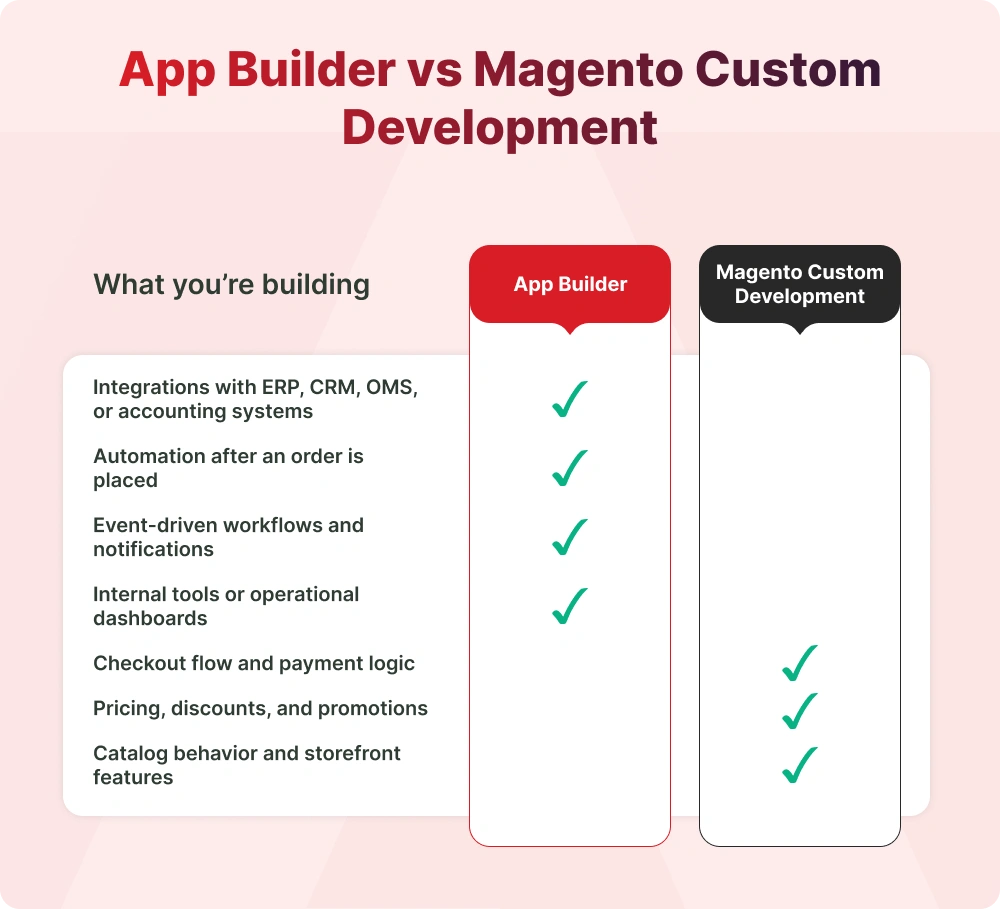
This isn’t about replacing Magento development.
Magento modules are still the right choice when:
App Builder makes more sense when:
A good magento development company knows how to balance both, instead of forcing everything into one approach.
App Builder isn’t required for every Adobe Commerce project.
If most of your customization is simple, storefront-focused, and closely tied to Magento, traditional extension development may be enough. App Builder becomes valuable when complexity starts growing around Commerce, not before.
When App Builder is used where it fits, teams usually notice:
Nothing flashy. Just fewer problems over time.
Adobe App Builder isn’t about doing more. It’s about putting things in the right place.
When Adobe Commerce handles commerce and App Builder handles everything around it, platforms stay easier to manage, even as the business grows.

In this episode, we clarify when App Builder makes sense and when Magento custom development is still the right choice, using real-world Adobe Commerce scenarios.

If you’re exploring better ways to extend Adobe Commerce without increasing upgrade risk or long-term maintenance, VT Netzwelt helps businesses design practical App Builder and Magento development strategies that scale cleanly. Let’s talk through what makes sense for your setup.
Adobe Commerce App Builder refers to using Adobe App Builder to extend Adobe Commerce with integrations, automation, and workflows that run outside the core platform.
The main benefits are safer upgrades, cleaner integrations, faster changes, and keeping Adobe Commerce focused on storefront performance.
Common use cases include ERP and CRM integrations, order and inventory automation, internal dashboards, event-driven workflows, and supporting headless or multi-channel commerce.

Are You Prepared for Digital Transformation?
Adobe Commerce Development
A practical guide to Magento 2 ERP integration for growing brands. Compare connectors, middleware, and custom builds. See real results from our Oracle ERP project.

Magento Development
Get insights into Magento migration pricing in 2026 for US retailers, covering customization, integrations, and project complexity.

Adobe Commerce Development
See how Adobe Sensei and AI in Adobe Commerce improve personalization, search, merchandising, and ROI with real US use cases, costs, and results.