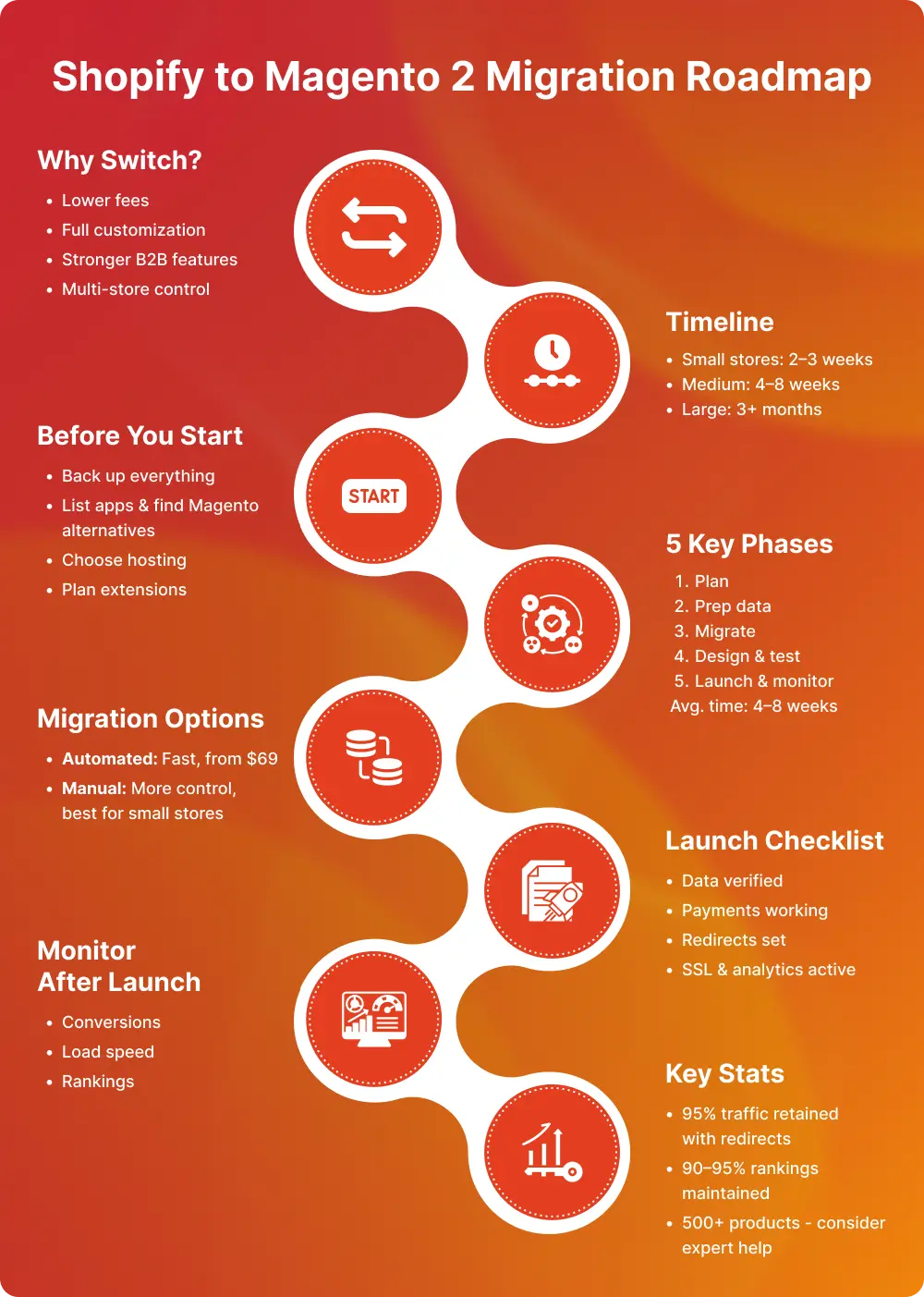
- Customize everything without template restrictions
- Ditch subscription fees and transaction costs
- Handle B2B with complex pricing and bulk orders
- Run multiple stores from one dashboard

A lot of US businesses, from LA fashion retailers to Texas B2B distributors, are jumping to Magento 2 right now. They need more control and better customization, plus they're tired of monthly fees. That's where Magento migration services come in.
Moving platforms isn't something you want to mess up, so here's your complete guide.
Once you hit a certain size, Shopify's limitations become obvious.
Audio Advice in North Carolina saw a 47% conversion rate jump after migrating. Real results.
A little prep work saves major headaches.
Back up your entire Shopify store. Products, customers, orders, images, videos, blog posts, settings, all of it. Put copies in the cloud AND on an external drive.
Count your products. List your current Shopify apps. Research which Magento extensions you'll need. Some apps won't have direct replacements.
Pick your hosting first. US companies usually go with cloud hosting (AWS, Google Cloud), managed Magento hosting (Nexcess, Cloudways), or dedicated servers for high traffic.
Working with a magento web development company makes installation easier. They'll handle the download, compatibility checks, and basic configuration.
Migrating from Shopify to Magento 2 is not a single action. It is a structured process that involves planning, technical execution, testing, and optimization. Below is a more detailed breakdown of what happens at each stage of a professional Shopify to Magento 2 migration.
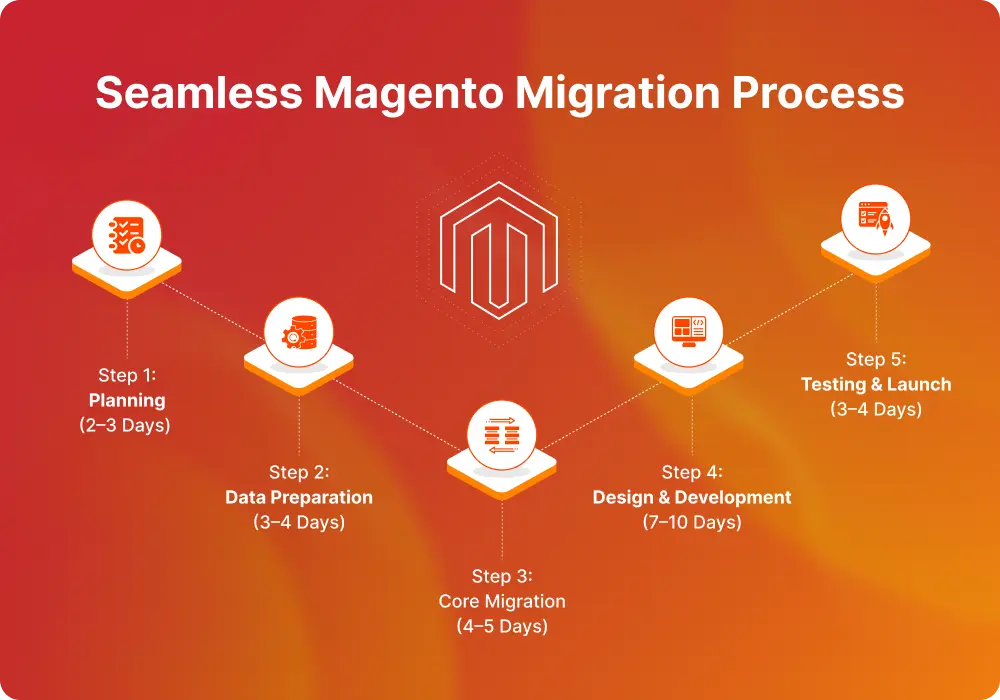
Define the strategy. Audit your Shopify store, identify customizations, map data structure, plan SEO redirects, and decide your migration method.
Export and clean data. Transfer products, customers, orders, and blogs. Remove duplicates and prepare attribute mapping for Magento 2.
Move and configure. Import data into Magento 2, set up payments, shipping, taxes, and store structure.
Rebuild and optimize. Develop the Magento theme, install extensions, recreate features, and optimize performance.
Test and go live. Check checkout flow, payments, redirects, SEO settings, analytics, then launch and monitor.
A professional magento migration company typically runs this in controlled environments first before pushing anything live. This prevents data loss and downtime.
Two main options are as follows:
Cart2Cart and LitExtension handle Shopify to Magento 2 migration automatically. Starts around $69, quick transfers, pretty simple, test it free first. Your design won't transfer though, and some settings need manual tweaking.
For stores under 500 products or when working with a magento web development company. Export from Shopify, format for Magento 2, import, verify. More control, more work.
Moving your data is just step one. Here's what actually matters for long-term success. These are as follows:
Set up 301 redirects for every URL. Products, categories, blogs - everything. Map old Shopify URLs to new Magento 2 ones. California retailers doing this right keep 95% of organic traffic.
Before launching: test load times, checkout process, payment gateways, email sending, inventory syncing.
Magento 2 has tons of extensions for search, customer segmentation, marketing automation, and analytics.
Every migration hits some bumps. Here's what usually goes wrong and how to fix it. These are as follows:
Check: accuracy of product data, accuracy of customer accounts, accuracy of payment processing, correctness of shipping calculations, correctness of SSL certificate, correctness of analytics, correctness of email templates, correctness of train teams.
Watch first-month: Conversion rates, order values, load times, support tickets, rankings.
Moving to versions of Magento 2 is not a walk in the park. Follow this checklist in order to avoid mistakes and keep your data intact. Whether using any automated tools or services of a Magento migration company, initiate a proper plan and do a thorough review before launching. Magento 2 gives you the liberty to actually grow your business.

From backups and data mapping to design rebuilds and launch testing, we walk through what actually happens during a migration.
Whether you use automated tools or hire a Magento migration company, planning is everything.
Listen to this podcast and make your platform upgrade smooth and secure.

Successful migrations do not happen by accident. They require the right expertise, appropriate planning and a team that's done this dozens of times before. Book a free migration consultation with VT Netzwelt to get free of charge answers. What your particular migration includes, realistic timelines, and true phases, and what it'll cost you. No sales pitch, but just honest, helpful advice.
The timeline for a Shopify to Magento 2 migration depends on store size and complexity. Small stores (under 1,000 products) typically take 2–3 weeks. Mid-sized ecommerce businesses usually require 4–8 weeks. Large catalogs with custom features, B2B functionality, or third-party integrations can take 2–3 months when handled by a professional Magento migration company.
If handled correctly, your SEO rankings should remain stable. Proper 301 redirects, metadata transfer, URL mapping, and technical SEO implementation help retain 90–95% of organic traffic. Professional Magento migration services ensure your search rankings and domain authority are protected during the transition.
Yes, encrypted customer passwords can be migrated using specialized Shopify to Magento 2 migration tools. Professional migration experts use secure methods to transfer customer data, order history, and login credentials without compromising security or compliance.
Shopify apps do not work on Magento 2. You will need equivalent Magento extensions or custom development. A Magento web development company can recommend suitable Magento modules to replace marketing tools, subscriptions, analytics, or automation apps.
For small stores with simple configurations, automated tools like Cart2Cart or LitExtension may work. However, if you have over 1,000 products, B2B pricing rules, custom integrations, or high monthly traffic, hiring an experienced Magento migration company is strongly recommended to avoid data loss, downtime, and SEO issues.

Are You Prepared for Digital Transformation?
Adobe Commerce Development
A practical guide to Magento 2 ERP integration for growing brands. Compare connectors, middleware, and custom builds. See real results from our Oracle ERP project.
Magento Development
Get insights into Magento migration pricing in 2026 for US retailers, covering customization, integrations, and project complexity.

Adobe Commerce Development
Compare Adobe Commerce and Shopify Plus pricing, features, and scalability for 2026. See real strengths, weaknesses, and which fits your business.