Ask three iOS teams what your app will cost and you can walk away with three quotes thousands of dollars apart. None of them are wrong. An app's price swings on decisions most founders have not made yet when they first ask, so the same idea can fairly carry a $20,000 estimate or a $200,000 one. This guide is about making those decisions on purpose, so the number you land on is one you chose rather than one you were handed.
Short version: most iOS apps built in 2026 land somewhere between $10,000 and $300,000. If your real question is how much does it cost to make an app in 2026, that range is the honest starting point, and the distance between those two numbers is the whole point of this guide. The final figure depends on what you build, who builds it, and where they sit.
So if you came here looking for a single clean figure to put in a budget line, here is the honest one: there isn't one yet. There is a range, and there is a way to narrow it down to a figure you can defend to a board or a co-founder. That second part is what we spend most of this guide on.
First, the quick map. The reasoning comes right after.
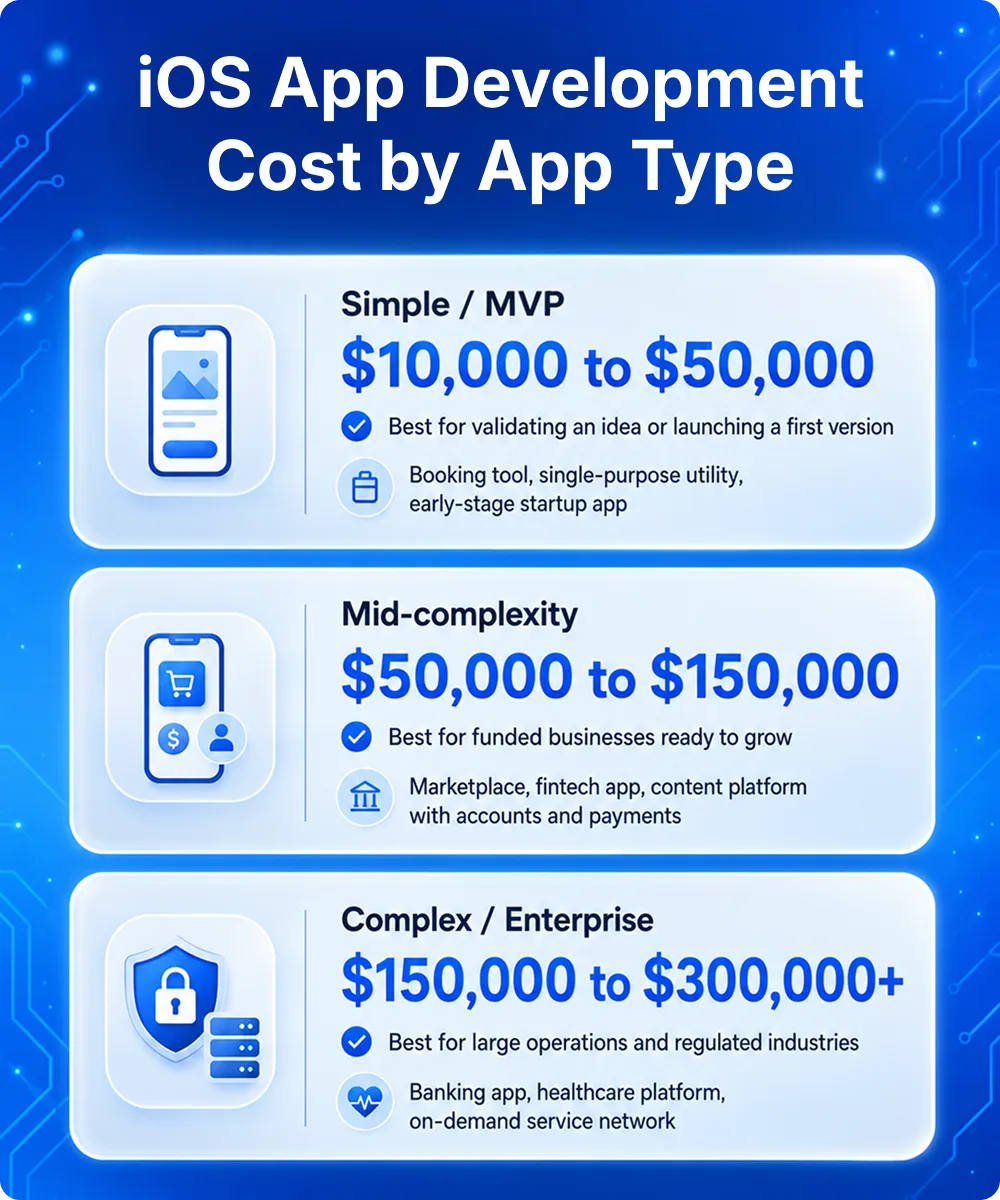
App type
What it covers
Typical 2026 range
Simple / MVP
Core features, basic UI, a handful of screens, one or two integrations
$10,000 to $50,000
Mid-complexity
Polished UI, payments, APIs, user accounts, analytics, admin panel
$50,000 to $150,000
Complex / enterprise
Heavy backend, advanced security, real-time data, AI features, compliance
$150,000 to $300,000+
These are working ranges rather than quotes. Treat them the way you would treat a property price band before a survey. Useful for planning, too blunt to sign anything against.
What goes into iOS app development cost in 2026
The cost to build an iOS app is rarely just the price of Swift code. When you pay for a build, you are paying for a sequence of work, and each stage has its own hours.
A typical build breaks down into discovery and planning, UI/UX design, development, quality assurance, and deployment. Most teams price it on a simple underlying formula: development hours multiplied by an hourly rate, plus overheads like project management and post-launch support. Everything that follows is an explanation of why those hours and that rate move so much from one project to the next.
Here is roughly how a build budget splits across those stages. The shares move with the project, but the shape holds for most apps.
Stage
What it covers
Rough share of budget
Discovery and planning
Scoping, requirements, architecture decisions
10 to 15%
UI/UX design
Wireframes, visual design, prototypes
15 to 20%
Development
Building the iOS app and its backend
45 to 55%
Quality assurance
Testing across devices, OS versions, edge cases
10 to 15%
Deployment and project management
App Store submission, coordination, handover
10 to 15%
There is also a layer that quotes love to leave out, and it is the layer that catches first-time founders. Apple charges a mandatory $99 per year for the Apple Developer Program before you can publish anything. App Store review can add a few days to your launch window. And in 2026 there is a fresh line item that did not exist eighteen months ago, which we will come to in the section on design.
The factors that move the cost the most
If you only remember one thing from this guide, make it this: a small number of decisions set most of your budget. Get clear on these five and your range collapses fast.
How much app you build first
A pared-back first version with only the core features will always cost a fraction of a fully loaded product. This is the single biggest lever a founder controls, and it is almost always the right one to pull.
Feature and integration complexity
Login and a content feed is cheap. Real-time chat, payments, maps, third-party APIs, offline sync, and anything touching AI all add hours, and they add testing hours too, which people forget.
Design quality, and Liquid Glass in particular
More on this below, because 2026 changed the math here.
Where your team is
This is the largest swing factor of all, and it deserves its own breakdown.
What you commit to after launch.
An app is not a one-time purchase. Maintenance, hosting, security, and OS updates are an annual cost, and budgeting for them upfront is the difference between a healthy product and a stalled one.
Why team location swings the price so hard
The same Swift codebase can cost wildly different amounts depending on where the people writing it live. Rough 2026 rates look like this:
Region
Typical hourly rate for experienced iOS work
US and UK
$120 to $250
Western Europe
$80 to $150
Eastern Europe
$30 to $80
Latin America
$25 to $60
India and South-East Asia
$15 to $50
A useful way to model a real build is with a blended team rate rather than a single developer's rate, since a project needs designers, developers, QA, and a project manager. A blended rate around $70 to $80 an hour across a four-month commercial build is a reasonable planning assumption for a quality offshore or hybrid team. Multiply that out and a mid-complexity app sits comfortably in the $50,000 to $120,000 band, which lines up with the table at the top.
Cheaper is not automatically better, and pricier is not automatically safer. What you are buying is App Store release experience. A team that has shipped, been rejected, fixed it, and shipped again will save you more in avoided mistakes than the headline rate suggests.
How Liquid Glass changes the 2026 design budget
One cost driver is new this year. iOS 26 introduced Liquid Glass, Apple's first major design overhaul since iOS 7, with translucent layers, light refraction, and depth effects running across the system. Apple has set a deadline for apps to fully support the Liquid Glass design system by September 2026.
For a brand new app, this just means designing in the current language from day one, which is normal. For an existing app, it means a real audit, redesign, and QA pass, and that work carries a real number. Multi-platform apps feel it most, because the polish has to be done thoughtfully on each side.
Budget for the gap. There is often a 30 to 40 percent difference between a basic development quote and the full reality of Apple's compliance rules, design requirements, and yearly platform updates. Good budgeting plans for that gap on purpose instead of being surprised by it later.
iOS app development cost by app type
The ranges at the top are easier to use once you can place your own idea on the ladder. This table adds the part founders usually want next: who each tier suits and what kind of app tends to land there.
For the simple tier, the goal is to build the smallest thing that proves the idea, ship it, and learn from real users before spending more. The mid tier is where the experience starts to feel finished and the architecture has room to grow. At the complex tier, the cost is driven less by screens and more by reliability, security, and scale.
Where you sit on this ladder is your decision more than your developer's. That is good news, because it means your budget is something you shape rather than something handed to you.
Native iOS vs. cross-platform: which is more cost-effective
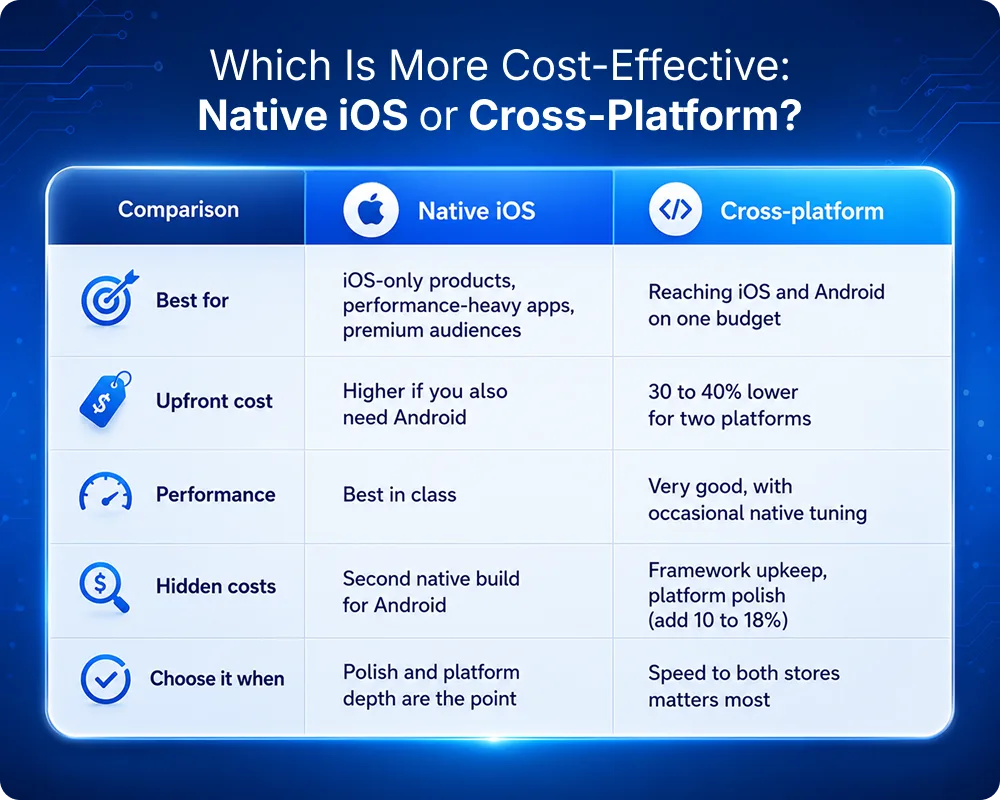
This question gets answered badly all over the internet, usually with a confident "cross-platform saves you 30 to 60 percent." That figure is real, but it answers a different question than most people are asking.
That saving applies when you build for iOS and Android together. Two separate native apps often run $80,000 to $150,000 per platform. A single cross-platform codebase in Flutter or React Native can deliver both for roughly $50,000 to $90,000 total, which is a meaningful upfront saving and a bigger one over time, since you maintain one codebase instead of two.
If you are building for iOS only, the comparison changes completely. There is no second platform to save on, so the real question becomes: am I likely to want Android later? If yes, cross-platform is often the smarter long-term call, and our breakdown of the top mobile app development platforms in 2026 compares Flutter, React Native, and native head to head. If no, or if your app leans on performance-heavy work like gaming, AR, or deep platform-specific features, native iOS usually delivers a better product and ages more gracefully.
One more thing the headline saving hides. Cross-platform carries its own running costs that quotes tend to skip: framework version upgrades, platform-specific UX polish so an iOS app still feels like an iOS app, yearly OS compatibility work, and the occasional native specialist for tricky integrations. Budget another 10 to 18 percent on top of the headline for these and you will not be caught out.
Here is the decision at a glance.
So the summary is simple. Cross-platform is the default right answer for most startups validating an idea across both stores. Native iOS earns its premium when performance, polish, or a premium user base is the whole point.
How to budget for your iOS app, step by step
This is the process we walk clients through. It turns a scary open question into four answerable ones.
Step 1: Define the smallest version that proves the idea
Write down the features your app genuinely cannot launch without. Then move everything else to a "phase two" list. Be ruthless. Most "must-haves" turn out to be "nice eventually."
Step 2: Place yourself on the complexity ladder
Using the section above, decide whether you are realistically a simple, mid, or complex build. This gives you a starting range.
Step 3: Choose a team model and region
In-house, freelancers, or an agency, and roughly where. This sets your effective hourly rate and turns the range into a number. A custom iOS app development company will usually cost more per hour than a freelancer and save you money overall through fewer mistakes and a single point of accountability, which matters more the more complex your app is.
Step 4: Ring-fence the running costs before you start
Set aside 15 to 25 percent of the build cost per year for maintenance, hosting, security, OS updates, and the Liquid Glass and compliance work Apple will keep asking for. An app you cannot afford to maintain is more expensive than an app you never built.
Do these four and you will walk into any conversation with iOS app development services able to put it in one sentence:
"We are a mid-complexity build, working with an offshore team, targeting roughly $X to develop with $Y a year after launch."
That sentence is worth more than any calculator.
How the MindSurf build kept costs in check
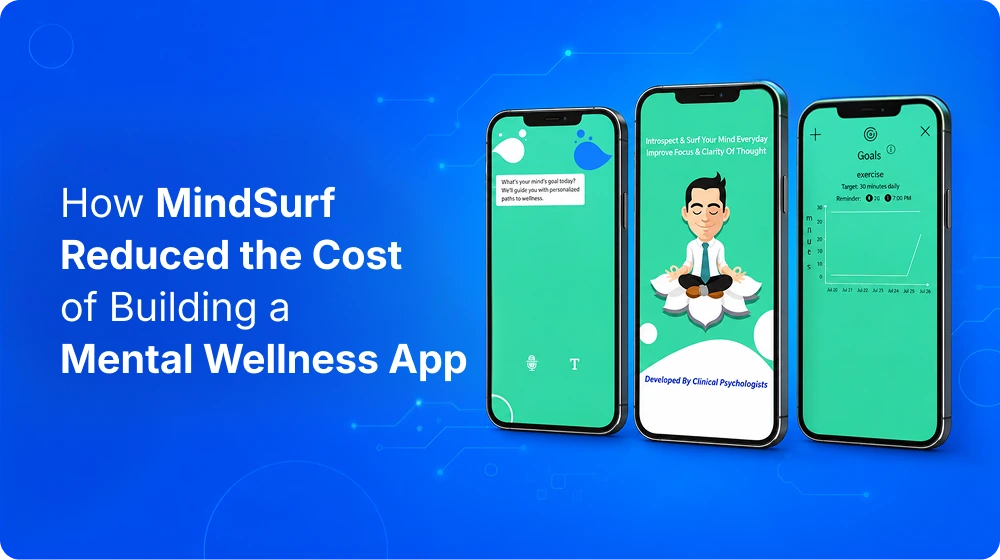
For a concrete example, take MindSurf, a mental wellness app our team built to help people manage stress and stay focused. It is a real project, and the way it was scoped is a useful model for keeping a budget under control. The brief was easy to state and easy to overspend on: deliver personalized stress tracking, with questionnaires written by clinical psychologists, on both iOS and Android, with no performance drop when those questionnaires ran. A few decisions kept the cost sensible.
A managed backend instead of a custom one
Rather than build and host server infrastructure from scratch, the app runs on Firebase: Authentication for secure and anonymous sign-in, Firestore for data storage and sync, Cloud Messaging for notifications, and Cloud Functions for scheduled prompts. Renting proven infrastructure like this is one of the most reliable ways to cut early development cost, because you are not paying to reinvent the plumbing every app needs.
Core experience first, features layered on later
The foundation was the stress-tracking and questionnaire flow. Goal setting, personalized feedback frequency, and a notification system that sends timely reminders were built around that core rather than all at once. That ordering is the same phased thinking this guide recommends.
Monetization planned from the start
MindSurf shipped with free and premium tiers from day one, using in-app purchases and ad monetization. Designing the business model into the architecture early avoids an expensive retrofit later.
Ongoing OS work as a real line item
Part of the job was keeping core plugins and libraries current as new OS versions landed, with stability tracked through Firebase Crash Analytics. This is the maintenance budget from step four in action rather than an afterthought.
The takeaway is not a single price tag. It is that the right architecture choices are what control cost: a managed backend, a clear build order, monetization planned early, and maintenance budgeted from day one. Decisions like these are why two teams can quote wildly different numbers for the same idea.
Smart ways to reduce iOS app development cost without hurting quality
There is a difference between cutting cost and cutting corners. These reduce the first without touching the second.
Start with an MVP and let real users tell you what to build next. This is the highest-leverage move there is.
Pick the right region or a hybrid team so your blended rate reflects the work rather than a zip code.
Lean on proven SDKs and backend-as-a-service for things like authentication and notifications rather than building them from scratch.
Work in short Agile cycles so you can change direction before a mistake gets expensive.
Design once, properly, in the current Apple language so you are not redoing it in six months.
Where not to cut: QA, security, and accessibility. Skimping there does not save money. It defers the bill and adds interest.
What this means for your project
If you take one idea away, let it be that how much it costs to make an app in 2026 is a decision more than a discovery. The ranges are wide because the choices are yours. Build lean, place yourself honestly on the complexity ladder, choose a team whose experience you trust, and fund the maintenance from day one. Do that and the number stops being scary and starts being a plan.
Wondering how much it really costs to build an iOS app in 2026? In this episode, we break down the key factors that influence app development costs, from MVPs and enterprise apps to design, development teams, maintenance, and Apple's latest requirements. Learn practical budgeting strategies to avoid overspending and make smarter decisions before starting your app project.
Ready to put a real number on your app?
Every range in this guide becomes a precise figure once we understand your idea, your timeline, and your goals. As a custom iOS app development company, we help founders and teams scope smartly, build in sensible phases, and budget for the long haul rather than just the launch.
Tell us what you are building, and we will give you a clear, honest estimate and a plan to match.
Frequently asked questions
The cost to build an iOS app in 2026 usually falls between $10,000 and $300,000. A simple or MVP app runs $10,000 to $50,000, a mid-complexity app $50,000 to $150,000, and a complex or enterprise app upward of $150,000. Where you land inside that span comes down mostly to scope, how much custom design you need, and where your team sits.
Scope is the big one. The more app you build before launch, the more everything else scales with it. After that comes feature and integration complexity, then design quality, where Liquid Glass compliance now counts. Team location belongs near the top too, since it alone can swing the total several times over for the same app. The factor people forget is maintenance, which keeps costing long after launch.
Build an MVP first and let real usage decide what comes next. That single move saves more than any other. The team matters just as much: a hybrid setup or a focused custom iOS app development company keeps scope tight, and proven SDKs for the common plumbing like sign-in and notifications bring the bill down further. The place not to economize is testing and security. Cut there and the savings come back later as a bigger bill.
When you need both iOS and Android, cross-platform usually lands 30 to 40 percent cheaper to build and maintain. For iOS alone there is no second platform to save on, so native tends to give you a better, longer-lasting app, especially for performance-heavy work. So it really comes down to one question: are you likely to want Android later?
Plan for 15 to 25 percent of the build cost every year. It pays for bug fixes, OS and design updates, hosting, and security, and it includes Apple’s $99 annual developer fee. This is a recurring line on the budget, so set it aside before you start rather than scrambling for it later.
A simple MVP is usually two to four months. Mid-complexity work runs four to six, and complex or enterprise builds can take anywhere from six months to well over a year. The quickest way to shorten that is a tight scope and a team that already knows the stack, which is why experienced iOS app development services pin down scope before committing to a date.
or most new products, yes. An MVP lets you launch the core idea cheaply, see what real users reach for, and spend the rest of the budget on the features that prove their worth. The alternative is paying upfront for things you only hope people want.
Kuldeep is a Solution Architect with 15+ years of experience in software development and technology. He specializes in mobile app development, iOS, and React Native, leveraging modern AI tools and technologies to accelerate development and deliver smarter solutions. Passionate about transforming business ideas into scalable, high-quality digital products.
Design one app that feels native on iOS and Android. Compare navigation, gestures, design systems, Flutter and React Native, then use the launch checklist.
Compare build, SaaS, and white-label ride-hailing software by 5-year TCO, control, compliance, data ownership, and exit risk to choose the right model.