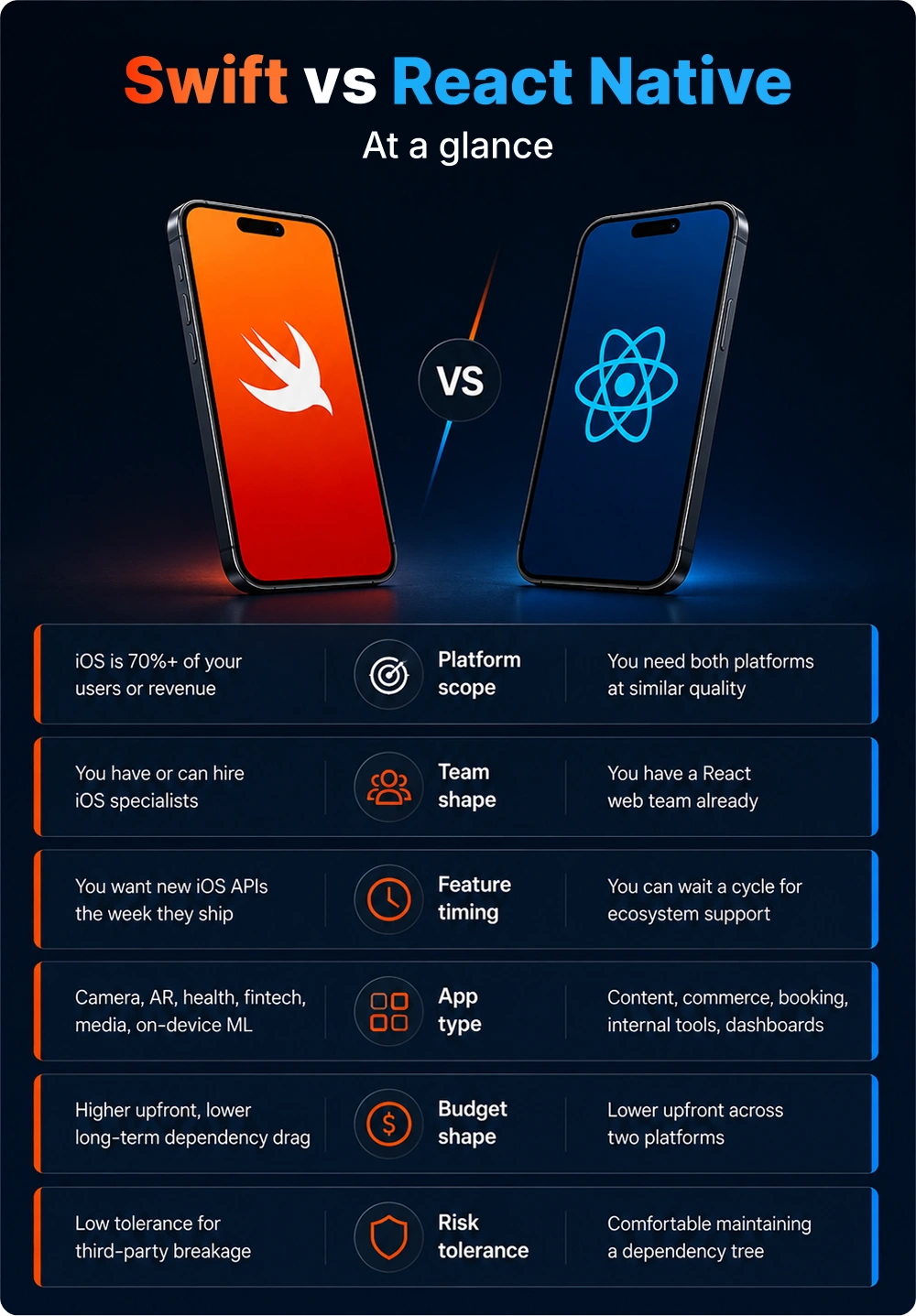
So, Swift or React Native? Pick Swift when iOS carries most of your revenue, when your app leans on the camera, sensors, or on-device AI, when you need new OS features the week Apple ships them, or when performance and security are features your customers pay for. Pick React Native when you need iOS and Android from one team, your app is mostly screens over an API, and getting to market fast matters more than platform polish. Most teams choose badly because they only compare the build quote.
Swift vs React Native: 10 Reasons to Choose Swift for iOS in 2026
August 4, 2026
Listen to Audio Version
Every June, the same conversation happens in mobile teams everywhere. Apple announces something at WWDC, a product manager sees the keynote, and by Monday there's a Slack message asking how fast we can ship it. If you're a Swift team, you answer with a date. If you're a React Native team, you answer with a dependency chain: wait for the framework release, then the Expo SDK, then somebody's community module, then the patch that fixes it.
Nobody in that second conversation did anything wrong. The delay is baked into the architecture.
Swift vs React Native at a glance
Before the list, some housekeeping. React Native in 2026 deserves better than the criticism it usually gets. The old asynchronous bridge is gone. JSI replaced it, letting JavaScript hold direct references to C++ objects and call methods with no serialization cost, and version 0.84 removed the legacy architecture entirely back in February. If you're arguing against React Native using anything you read in 2019, you're arguing with software that no longer exists.
What follows are the ten reasons that survive that upgrade.
1. Where the react native vs swift performance gap shows up
Swift compiles straight to machine code. No JavaScript engine, no C++ interop layer, no second runtime reconciling your view tree.
For most of what you build, none of that matters. A settings screen renders instantly either way, and any engineer telling you otherwise is selling something.
The gap opens at the edges: a feed of image-heavy cells scrolled fast, camera frames processed in real time, an audio pipeline, a 200 MB local dataset, background sync while the device is already warm. That's where you feel it, and you feel it as jank and battery drain rather than as a benchmark number.
Swift 6.4, announced at WWDC26, leaned further in. You now get borrow and mutate accessors that skip copies entirely, UniqueArray and UniqueBox for high-performance patterns without dropping into unsafe code, and explicit @inline(always) and @specialized control over the optimizer. No cross-platform abstraction can hand you those knobs, because the whole point of the abstraction is that the knobs aren't yours.
Quick gut check: if the hardest thing your app does is scroll a list, skip this reason. If the hardest thing it does is run a model while the camera is open, this one outweighs everything else here.
2. SwiftUI animation feels right without you fighting for it
SwiftUI draws on the same rendering path Apple's own apps use, so interruptible transitions, matched geometry effects, and scroll views that handle a mid-gesture direction change all come free.
React Native's new animation backend, which landed in 0.85 in April, closed most of this gap for real. Gesture-driven animation on the New Architecture is good now.
What stays stubborn is the final five percent: the rubber-band curve when someone over-scrolls, how a sheet's corner radius interpolates against the view behind it, the exact millisecond a toggle fires its haptic. Your users will never file a ticket about any of it. They'll just describe your app as feeling a bit off and won't be able to say why.
There's a moving target here too. Apple's iOS 27 direction pushes harder into depth, material, and continuous motion, which means a cross-platform renderer has to rebuild Apple's design system from the outside and then rebuild it again every September.
3. Day-one iOS features while everyone else waits
Of everything on this list, this is the reason that quietly costs the most money and gets argued about the least.
The rhythm never changes. WWDC lands in June. Swift teams open the beta that afternoon and start building. Cross-platform teams start a waiting game: the React Native release, then the Expo SDK, then a community module, then the fixes to that module. Expo SDK 56 shipped on May 21, 2026 with React Native 0.85 and a Xcode 26.4 minimum. Solid, current, and still a full Apple cycle behind what a Swift team could have in TestFlight.
Here's what that looks like feature by feature:
| iOS capability | Swift path | React Native path |
|---|---|---|
| Widgets and Live Activities | WidgetKit, day one | Community modules, or a Swift extension target you maintain anyway |
| App Clips | Supported directly | Separate native target regardless of framework |
| Foundation Models (on-device LLM) | Native Swift API with multimodal prompts and tool calling | Wait for a bridging module, or write your own TurboModule |
| App Intents and Siri | App Schemas, View Annotations, Entity Schemas | Native target plus custom bridging |
| StoreKit 2, ScreenTime, HealthKit | First-party frameworks | Third-party wrapper of varying quality |
Now the counterexample, because there is one and pretending otherwise would be dishonest. Callstack shipped a project called Voltra that lets you build Live Activities and widgets in React with no Swift at all. It works by mapping JSX to SwiftUI primitives. Impressive engineering. It also lives inside a 4 KB payload ceiling, supports only a subset of style properties, runs on iOS alone, and sits in public preview. Fine for a delivery-tracking activity. Risky for a feature your launch depends on this quarter.
Who should care most: anyone whose category rewards being first. Fitness apps at HealthKit updates, finance apps at Wallet changes, media apps whenever Apple touches Live Activities.
4. Hardware access that native iOS development takes for granted
Go down the list of things apps do with the device and you'll find Swift talking to each one directly: Secure Enclave, biometric prompts that fail in the right way, Core Motion at full sample rate, Bluetooth peripheral mode, NFC, background processing modes, precise location with the authorization flow Apple expects.
A concrete one from our own work. Benry Travel is a scenario-based language app our team built natively for iOS, and the constraint that shaped the whole architecture was app size. The audio and image library for a thousand-plus travel phrases pushed the build straight past App Store limits. We solved it with On-Demand Resources, splitting content into downloadable packs so a learner pulls only the languages and scenarios they want, with offline access and background sync behind it. The app went on to reach top-ten placement for seven high-intent search terms.
ODR has no cross-platform equivalent worth the name. That's the pattern across this whole category: the capability exists, someone has probably wrapped it, and the wrapper handles 80% of what you need until the day it doesn't.
5. Anything involving graphics, AR, or a model running on-device
Metal, RealityKit, ARKit, Core ML, and Vision were all designed assuming you're calling them from Swift. Bridging to them from React Native is possible. It just means your engineers spend their weeks on the bridge instead of on the thing the bridge exists to reach.
WWDC26 widened the gap here more than most people noticed. The Foundation Models framework now takes multimodal prompts, exposes on-device OCR and barcode reading through Vision, and supports Dynamic Profiles so you can swap models and tools inside a live session. Shipping an AI feature that runs locally, privately, with no per-token bill attached, is a couple of dozen lines of Swift. From React Native, the same feature is a small integration project with a maintenance tail.
Camera that understands what it's looking at, document scanner, form-check for a workout app, anything spatial, anything with a model on the device: swift app development gets you there in a fraction of the time.
6. Security defaults that survive an audit
Fintech, health, and enterprise apps get audited, and audits are less about your language than about your surface area.
Native gives you Keychain, Secure Enclave, and App Transport Security as direct calls, with certificate pinning, jailbreak detection, biometric gating, and data-protection classes all backed by Apple's threat model. React Native puts your business logic in a JavaScript bundle that's far easier to extract and read than compiled Swift, and hands your security reviewer a dependency tree to enumerate.
None of that disqualifies React Native for regulated work. Compliant apps ship on it constantly. What changes is where your budget goes. A bigger slice of it disappears into hardening and evidence-gathering, and your users never see any of that work. If you're working through requirements like these, our guide to HIPAA-compliant app development covers what auditors ask for.
7. Far fewer packages to keep alive
Open the package.json on a mature React Native app and count the dependencies with native code in them. Somewhere between 40 and 120 is typical in our experience. Every one is a maintainer who might get a new job, a version that might lag the next release, and a patch file you might inherit.
Month one, this costs nothing. Month fourteen is when a routine framework bump breaks three modules and you discover one of them was last touched in 2024. Teams end up forking libraries they never wanted to own, which is how a product engineer becomes an open-source maintainer by accident.
Swift projects lean on Apple's frameworks, which ship with the OS and get versioned by the same company that versions the OS. You'll still pull in third-party code. There's just much less of it, and the load-bearing parts are first-party.
8. Maintenance you can put in a budget
Apple deprecates slowly and tells you well in advance. An API gets marked, keeps working for years, and comes with a documented migration path. Leave a Swift app alone for eighteen months and it will usually still build.
React Native moves faster on purpose. In 2026 alone: 0.84 in February pulled out the legacy architecture and made Hermes V1 the default, 0.85 in April swapped the animation backend, 0.86 in June added Android edge-to-edge. Credit where it's due, the team has worked hard on upgrade smoothness and both 0.83 and 0.86 shipped clean with no breaking changes. But the cadence still assumes you're keeping up.
Plan for it. In our experience a React Native app needs a standing maintenance allocation for framework and dependency upkeep that sits outside feature work. Native iOS needs one too, just smaller, and Apple's annual release drives most of it, which means you can budget around September and mostly be right.
9. Xcode previews and Instruments
Short section, because the point is simple. Xcode renders SwiftUI views live across size classes and appearance modes with no simulator boot. Instruments profiles CPU, memory, energy, disk, and network against a real device timeline, and the memory graph debugger finds retain cycles visually.
React Native's DevTools have come a long way, and Fast Refresh is still one of the nicest iteration loops in mobile. The pain arrives at the seams. When a bug lives somewhere between JavaScript, the C++ layer, and native code, you're chasing it across three runtimes with three sets of tools.
10. The Apple feel your users can't describe
Ask someone why an app feels cheap and they'll struggle to answer. Push them and you'll get vague things: the keyboard covered the field, the back-swipe only worked from the very edge of the screen, the share sheet was missing an option they expected, the text got weirdly cramped when they turned up the font size for their eyes.
Every one of those is a small thing that native handles by default and cross-platform approximates. Most approximations are good. The leftovers are exactly where a four-star review becomes a five, and they're concentrated in details nobody thought to put in a spec.
If your interface is the product rather than the delivery mechanism for it, budget for that last mile honestly.
When React Native is the better call
We build in both, and this is the half of the argument that keeps us honest.
Go React Native when:
- You need iOS and Android at similar quality, and iOS isn't dominant. Two native codebases means two teams, two backlogs, two release trains, forever.
- Your app is mostly screens over an API. Commerce, booking, content, marketplaces, internal tools, field apps. The New Architecture handles all of it well.
- You already have a React web team. Shared mental models and shared TypeScript types are worth real money on day one.
- Getting to market fast beats polish. A validated product in twelve weeks beats a beautiful one in twenty-eight.
- You want over-the-air updates. Pushing a JavaScript fix without waiting on App Store review is a workflow advantage Swift has no answer to.
On money: our iOS app cost guide for 2026 puts most iOS builds between $10,000 and $300,000 depending on complexity. Cross-platform tends to deliver both platforms in roughly the $50,000 to $90,000 band, against $80,000 to $150,000 per platform for separate native builds. Use those to scope a conversation, never as a quote.
Watch the trap in that math: if you're iOS-only, there's no second platform to spread the saving across. You pay the abstraction tax and collect nothing for it.
How to decide, in order
Work down this list. The first clear answer usually settles it.
- Check your platform split. Your analytics, or your closest competitor's. iOS over 70% of revenue points hard at Swift.
- List the device features on your 18-month roadmap. Camera processing, AR, on-device ML, widgets, Live Activities, HealthKit, Siri intents. Three or more of those and you have your answer.
- Name the people, by name. A React team that will still be here in three years beats any benchmark on this page.
- Decide how much day-one matters. If shipping in week one of an iOS release wins you customers, that settles it.
- Set the compliance bar. Regulated data makes a large dependency tree expensive in ways that don't show up until the audit.
- Model three years of ownership. Framework upgrades, dependency maintenance, and the cost of a release you can't ship. The build quote is the small half.
Mixed answers through the first four steps usually mean you're a hybrid case. Which brings up the option most teams never seriously consider.
Nobody says you have to pick one
For anything past a certain size, swift or react native turns out to be a false binary.
The common production pattern: a React Native shell for the product surfaces that change weekly, with native Swift modules underneath for the parts that touch the platform. Camera, payments, widgets, Live Activities, on-device ML. TurboModules made that boundary far cleaner than it used to be, and synchronous calls through JSI killed most of the latency that made it painful.
It runs the other way too. Plenty of Swift apps embed React Native for one specific flow, usually a content section the marketing team updates constantly.
The catch is honest and worth stating: you're now maintaining two toolchains and hiring people fluent in both. Past roughly eight engineers, that's manageable and often smart. At three engineers, it will eat you alive.
Making the call
Strip away the framework loyalty and the choice comes down to a few honest questions about your own product. If iOS carries your revenue, if the app reaches for the camera or a sensor or a model running on the device, if being first to a new OS feature wins you customers, Swift pays back its higher starting cost over the life of the product. If you need two platforms out of one team and the app is mostly well-built screens over an API, React Native gets you there faster and cheaper, and the New Architecture means you give up far less than the old debates would have you believe.
For plenty of teams the truthful answer is some of both: a React Native core with Swift underneath wherever the platform earns it.
The one move to avoid is deciding on the build quote alone. That figure is the cheapest part of the whole decision and the one most likely to point you the wrong way.
🎧What's the Best Framework for Your Next Mobile App?

Every mobile app has different technical requirements. Some demand native performance and deep integration with Apple technologies, while others benefit from faster cross-platform development and shared code.
Making the right technology choice early can reduce development costs, simplify maintenance, and support long-term product growth.
In this episode, we break down Swift and React Native, compare their strengths, and explain which framework best fits different business needs.
Not sure where your app lands?
That's the conversation we have most weeks. Our team has shipped native iOS and React Native apps since 2013 across fintech, health, EdTech, and retail, and before we recommend either one we'll go through your feature list, your platform split, and your 18-month roadmap with you. If native would be overkill for what you're building, we'll say so plainly.
Start here: talk to our iOS app development team about a native build, or see how we scope cross-platform app development when you need both platforms at once.
Frequently asked questions
Swift is better for iOS-first apps that depend on device hardware, performance, or day-one access to new OS features. React Native is the better choice for products that need iOS and Android from one team and are mostly screens over an API. Neither wins in the abstract. The right question is which one fits your platform split, your team, and your roadmap, and we’ve built apps we’d have refused to build in the other technology in both directions.
Yes. Swift is faster in every situation where users can feel it: sustained scrolling through complex lists, real-time media, large local datasets, background work under memory pressure, and cold start. The gap is smaller than it used to be, because React Native’s New Architecture removed the old serialization bottleneck and JSI now moves serious volume. React Native’s own docs cite VisionCamera handling roughly 2 GB of frame data per second, which the old bridge could never have done. On a typical business app nobody will notice the difference. On a compute-heavy one they will notice within a week.
Learn React Native if you come from web development or want the widest pool of job openings, and learn Swift if you want to build hardware-rich iOS apps or command stronger senior rates. React Native transfers straight across from React and takes about two weeks to get productive in. Swift has fewer openings but far less competition per opening, and native iOS development stays a scarce skill that compounds in value over five years.
Choose Swift when iOS is your primary platform, when the app uses the camera, sensors, AR, or on-device models, when new iOS features matter at release, when you’re in a regulated category, or when the interface itself is the product. Any two of those together make it a straightforward call. Our iOS app development team walks through this assessment before anyone writes code.
Swift is the harder language but the easier ecosystem. It asks you to learn strict static typing, optionals, protocol-oriented design, and a concurrency model that catches data races at compile time, all more upfront work than JavaScript. In return you get first-party documentation, one toolchain, and one place to look when something breaks. React Native starts easier and gets harder later, since real fluency means JavaScript plus React plus native build systems plus a dependency ecosystem. Most people ship faster in React Native and understand what they shipped faster in Swift.
For a single platform, a Swift app costs about the same as a React Native app, and sometimes less on complex features because there are no bridges to build. For two platforms, React Native is meaningfully cheaper upfront. Over three years the gap narrows as dependency maintenance and framework upgrades accumulate on the React Native side. Any number quoted without your feature list is guesswork, so treat published ranges as scoping aids and get a real estimate against a real scope.
Yes. Swift and React Native run together in the same app, and for larger products it’s often the right architecture. Build the shell and the fast-changing product surfaces in React Native, then drop to Swift through TurboModules for camera, payments, widgets, Live Activities, or anything touching Core ML. Widgets and App Clips need a native target no matter what you choose, so most serious React Native iOS apps already contain Swift. Our cross-platform development team draws that boundary at the start, since retrofitting it later gets expensive fast.

Kuldeep is a Solution Architect with 15+ years of experience in software development and technology. He specializes in mobile app development, iOS, and React Native, leveraging modern AI tools and technologies to accelerate development and deliver smarter solutions. Passionate about transforming business ideas into scalable, high-quality digital products.
Table of Content
Are You Prepared for Digital Transformation?