If you cannot name three things that will be measurably better in HubSpot, you are not ready to migrate. Cost on its own is an argument for renegotiating, and renegotiating is a great deal cheaper than replatforming.
The renewal quote lands and it is bigger than last year's. Salesforce raised list prices roughly 6% across Enterprise and Unlimited editions in August 2025, and most order forms carry an annual uplift clause that compounds on top of whatever you negotiated last time. Somebody in the room asks the question that starts every one of these projects: what would it take to move to HubSpot?
The short version: a Salesforce to HubSpot migration runs in five phases. Audit and clean the data in Salesforce, design the HubSpot data model, import records in dependency order (Companies, then Contacts, then Deals, then Tickets, then Engagements, then Attachments), rebuild the automation by hand, and validate everything against a Salesforce baseline before the old system goes read-only. Mid-market projects usually take 6 to 12 weeks of elapsed time, and partner-led work commonly lands between $15,000 and $50,000 depending on data volume and how much configuration has piled up in the org. Those figures are planning ranges for a scoping conversation, and any firm number should come after an audit.
The rest of this Salesforce to HubSpot migration guide covers what maps cleanly, what quietly does not, and where these projects tend to come apart.
Moving the data is the easy part. Anyone can export a CSV.
What makes these projects hard is that Salesforce and HubSpot model a business differently, which means a migration drags every deferred decision into the open at once. Which lifecycle stages survive? Does anybody use those 340 custom fields, and can anyone explain the two Process Builder rules from 2019 that still route half your deals?
A realistic scope covers six areas: the data itself (contacts, companies, deals, tickets, activity history, attachments), the schema that holds it (properties, pipelines, stages, owners, teams), the automation layer, every integration reading from or writing to the CRM today, the reports leadership opens on Monday, and adoption, which includes the fragile fortnight after cutover. Leave any one of those out of scope and what you have at the end is a populated database that nobody sells from.
Cost pressure is usually the trigger, though it is rarely the whole story.
The August 2025 increase applied to Enterprise and Unlimited editions of Sales Cloud, Service Cloud, Field Service, and several industry clouds. Stack that on the 8% to 10% annual uplift clauses common in multi-year order forms and teams renewing through 2026 are absorbing compounding increases against a raised baseline. Sales Cloud Enterprise now lists around $175 per user per month. Most mid-market buyers negotiate well under that, but list price sets the anchor, and the anchor moved.
The second driver is stack sprawl. A Salesforce line item plus a marketing automation platform plus a sales engagement tool plus an admin salary is a very different number from the one on the license, and consolidating several of those into one platform is where most of the TCO argument lives.
The third is adoption. A CRM your reps avoid produces data nobody trusts, and untrusted data produces forecasts nobody believes.
Be careful about the trade, though. HubSpot's data model is simpler by design, and simplicity has a cost: less room for the genuine complexity that some sales processes carry for good reasons. If your business runs on multi-level approval matrices, territory-based sharing rules, and a dozen interlocking custom objects, you may find yourself spending the licensing savings on rebuilding those inside a platform that was never designed to hold them. Our HubSpot vs. Salesforce comparison works through where each platform earns its keep.
Send this table to your RevOps lead before anyone touches an export.
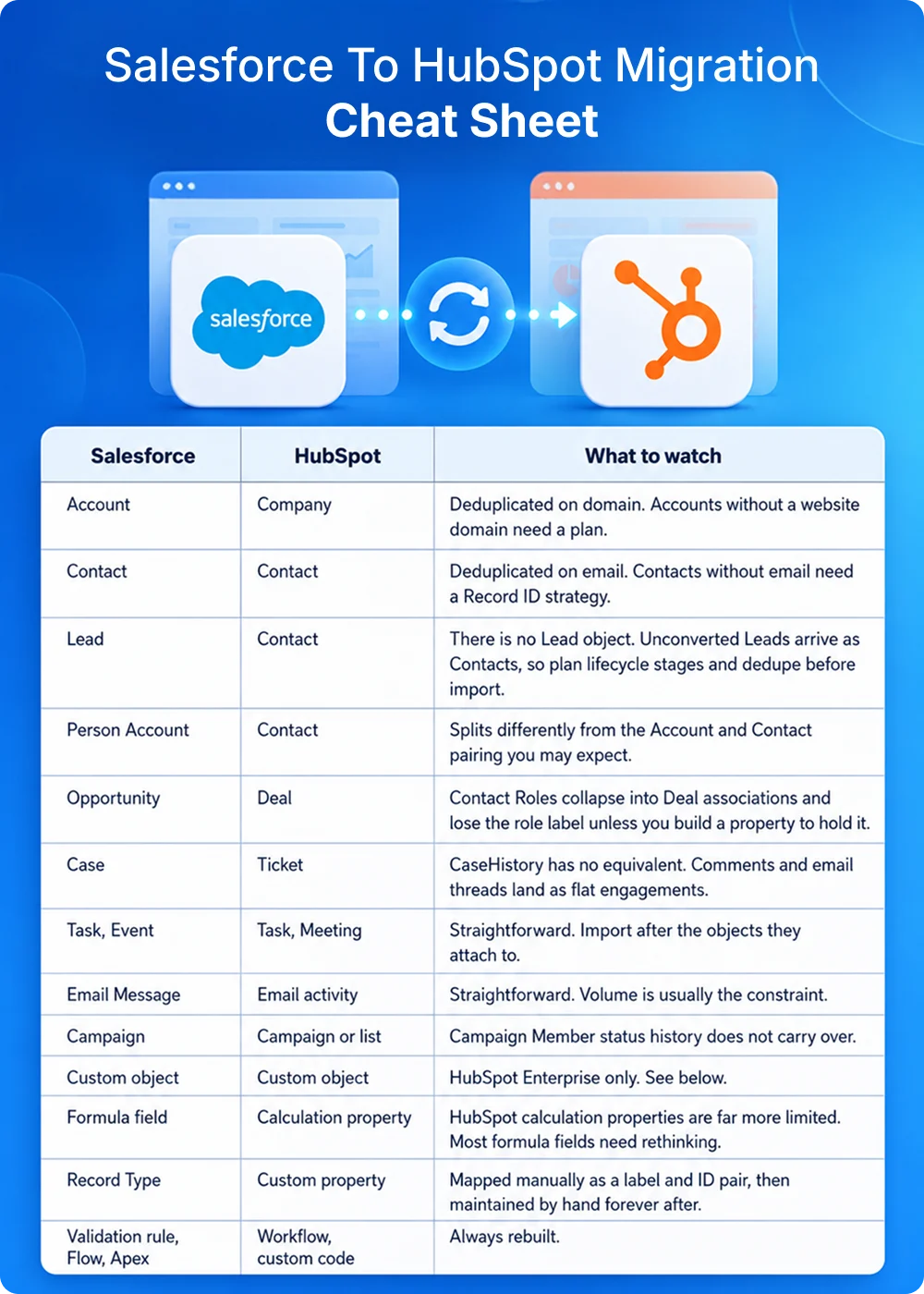
The Lead-to-Contact collapse is where most migrations lose data. Salesforce's convert action has no HubSpot counterpart, so any custom field living on the Lead object gets stranded unless somebody flags it during the audit.
HubSpot now ships a self-serve migration tool called Smart Transfer, and Salesforce is a supported source. It runs across all products and plans, audits your Salesforce configuration before it moves anything, and builds the matching properties, pipelines, currencies, and users in HubSpot for you. It even generates a backfill workflow so Deal create dates reflect the Salesforce source instead of the import date.
The limits are documented plainly, which is more than most vendors manage. Per HubSpot's supported apps reference, the transfer runs one-way with no sync back to Salesforce. Custom objects are excluded entirely. Five Salesforce field types are unsupported: calculated (which covers every formula field), encryptedstring, reference, JunctionIdList, and masterrecord. Attachments and campaign lists move only through a one-time post-sync transfer, and that data goes stale the moment it lands. Access is restricted to Super Admins, and custom field mappings need a Data Hub subscription.
What it does cover is Accounts, Person Accounts, Contacts, Leads, Opportunities, Cases, Notes, Tasks, Events, and Email Messages, plus five association types including Opportunity Contact Roles. For a clean org running standard objects, that is most of the job done. For an org carrying eight years of accumulated customization, it gets you about 70% of the way and the remaining 30% is where the budget goes.
Every hour spent here saves three later. Deciding to migrate Salesforce to HubSpot is mostly a decision about what to leave behind, and this is the phase where you make it.
Audits rhyme. Not as a rule, but often enough that it is useful to know the shape before you start. An org that has been on Salesforce six or seven years tends to arrive with a few hundred custom fields spread across the core objects, a minority of which carry data on most records. There is usually a Lead table holding years of inbound nobody ever worked, a handful of Flows with no living owner, and at least one integration that broke quietly some time ago and got replaced by a spreadsheet that three people now depend on. Your numbers will land somewhere different, though the shape rarely does.
If your org has grown past the point where anyone can explain it end to end, an audit run by a team that works across both platforms pays for the fortnight it takes.
This order is a dependency chain. Import a Contact before its Company exists and the association fails silently, which leaves somebody rebuilding thousands of links by hand three weeks later.
1. Users and owners. Create HubSpot users and assign ownership before anything else, because ownership drives routing, reporting, and permissions, and retrofitting it is miserable work.
2. Properties and pipelines. Build the schema before data arrives, designing for how the business runs today instead of replicating Salesforce stages out of habit.
3. Companies. Every Contact and Deal hangs off an Account, so Companies land first. Always.
4. Contacts. With Companies in place, associations resolve on import. Include the company domain column so HubSpot can match them.
5. Deals. These associate to both Contacts and Companies, so both must already exist.
6. Tickets. Cases become Tickets, associating up to Contacts and Companies.
7. Engagements. Notes, calls, emails, meetings, and tasks all attach to records that need to be there already.
8. Attachments. Files go last. The native connector will not move them, so this is a separate job every single time.
Validate record counts after each step before you start the next one. HubSpot's published import limits are useful to have in front of you: 1,048,576 rows per file, 512 MB per file, 10 million rows per day through the UI, and up to 80 million per day via the imports API. Practically speaking, batches of 5,000 to 10,000 records keep error handling survivable.
Salesforce automation does not travel. Flows, Process Builder rules, validation rules, assignment rules, approval processes, and Apex triggers all get rebuilt by hand in HubSpot, and no tool on the market changes that.
Teams hear this and brace for the worst. It is the most valuable thing the project will do for you.
Most Salesforce orgs are carrying three to five years of accumulated automation exceptions that stopped describing the business some time around the last reorg. A migration is the only realistic moment anyone will let you throw them away. Take the list from your audit, keep what has a named owner and a live use case, and rebuild exactly that. Where the logic has to span both platforms during a transition, orchestration tools like n8n can carry routing and campaign tracking that neither CRM handles well alone, which is the pattern behind our Kiteworks build.
Four things to plan around. Build your workflows early but leave them paused, because automation firing mid-import will email contacts who never consented to hear from you and mangle lifecycle stages on the way through. Lifecycle stage transitions behave differently in HubSpot, so decide whether they run automatically or manually before the first record lands. Sequences rebuild separately from workflows if you are coming off Salesforce Engage or a sales engagement tool. And email sending domains, unsubscribe preferences, and consent settings all need configuring before a single marketing email leaves the portal.
Formula fields are the sharp edge. HubSpot calculation properties handle simple arithmetic and date math competently. Anything that reaches across to related records becomes a workflow, a Data Hub custom-coded action, or a loss you accept and document.
Three routes exist, and most real projects blend them.
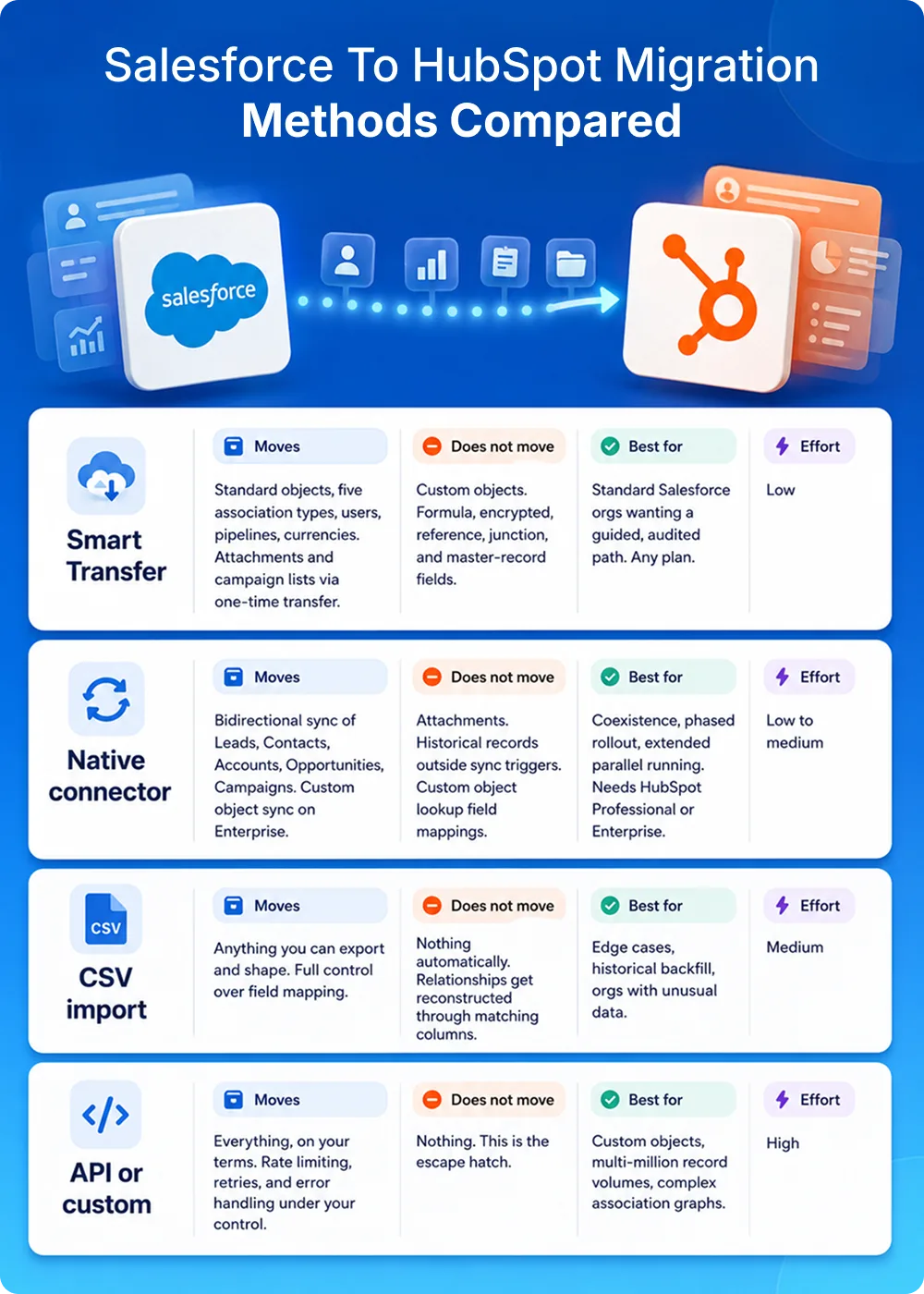
One caution on the native connector. It was built to keep two live systems in step, and it is very good at that job. Point it at a migration and it will leave historical data behind and skip file attachments without telling you.
Custom objects deserve a straight answer, and it comes in three parts. HubSpot custom objects require an Enterprise subscription on at least one Hub, so below Enterprise the question is moot. Smart Transfer will not touch them at any tier. The native connector can sync Salesforce custom objects on Enterprise, with two conditions: you have to build the object in HubSpot first, and lookup fields cannot be field-mapped, so those relationships come across through association settings instead. If Enterprise is out of reach, flatten the custom object onto a standard record using custom properties and association labels, and write down what you gave up.
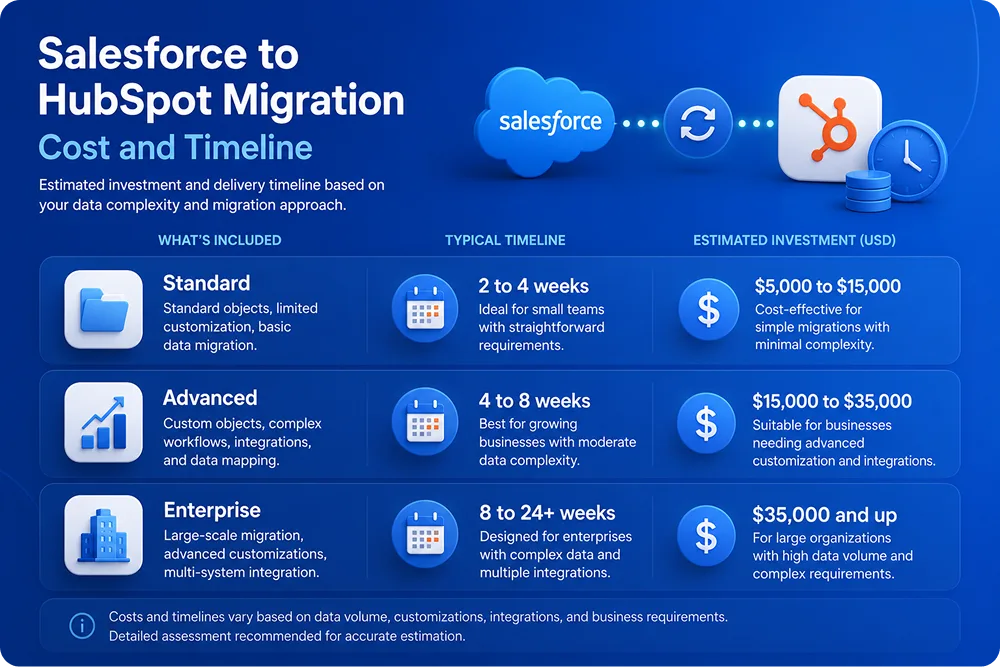
Treat those as planning ranges for a scoping conversation. Data volume matters less than three other things: how many live integrations you have, how many custom objects are in play, and whether a single person can still explain your Salesforce automation.
Then there are the costs that never appear on a migration invoice. Rep learning time runs five to ten hours a head, which for a 50-person team at a loaded $50 an hour is $12,500 to $25,000 of selling time that shows up nowhere in the project budget. You pay for both platforms during the parallel period, normally two to four weeks. And revenue commonly softens during the transition, so staff support properly for launch week and keep the cutover well away from your biggest closing month.
Migrations rushed through in under four weeks have a habit of reappearing as a remediation project inside 18 months. The time you save is borrowed at a poor rate.
Nothing goes read-only until every line here passes.

Moving to HubSpot can simplify CRM operations, but only when the migration is planned with the right data strategy, workflow design, and implementation approach.
Understanding what transfers successfully, what requires manual work, and how to validate your CRM before launch can help avoid costly migration issues.
In this episode, we explore every phase of a Salesforce to HubSpot migration and the practical steps businesses can take to ensure a successful transition.

Most Salesforce to HubSpot migration services will quote off a record count. Anyone can move a CSV. Far fewer can tell you which 200 of your 340 custom fields to leave behind, and fewer still will say so before you have signed something.
Five questions that separate them:
That last one tells you the most. Any partner who reaches the HubSpot answer before understanding your question is selling a license.
Some of the best CRM projects never become migrations. Working with Kiteworks, a global cybersecurity company scaling through acquisitions, the right answer turned out to be coexistence. Our team built two-way sync between Salesforce and HubSpot to unify lead lifecycle and campaign data, rebuilt legacy WordPress landing pages in HubSpot CMS, and automated lead assignment and campaign tracking through custom n8n workflows, alongside Zoom Chat and LinkedIn ROI tracking integrations. The published outcomes include a 21% reduction in lead response time and a 23% drop in manual data entry. The full Kiteworks case study walks through the architecture. Where Salesforce is still doing real work somewhere in the business, running both is a legitimate answer.
When migration is the right call, VT Netzwelt's HubSpot migration services cover audit, data model design, import, automation rebuild, and the integration work that otherwise surfaces at week nine.
Planning a move? Talk to our CRM team about an audit-first migration scope.
Related reading
You clean the Salesforce data first, then design the HubSpot data model, import in dependency order, rebuild the automation, and validate before cutover. Import order runs Companies, then Contacts, Deals, Tickets, Engagements, and Attachments last. Smart Transfer will take a standard org end to end, though custom objects and formula fields still need CSV or API work alongside it.
Budget six to twelve weeks if you are mid-market with moderate complexity. Small teams on standard objects finish in three to six. Enterprise orgs carrying custom objects and multiple integrations run 16 to 24. Integration count and undocumented automation drive that number far harder than record count does, which is why two companies the same size can quote three months apart.
Most mid-market projects land between $15,000 and $50,000. Small clean orgs start nearer $7,000, and enterprise runs past $50,000. Treat those as planning ranges: they exclude parallel licensing, rep learning time, and the productivity dip through transition weeks. Anyone quoting a fixed figure before auditing your org is guessing.
Yes, on HubSpot Enterprise. Custom objects need an Enterprise subscription on at least one Hub, which settles it for most Professional portals. Smart Transfer excludes them at every tier. The native connector syncs them on Enterprise, though the object has to exist in HubSpot first and lookup fields travel through association settings. Below Enterprise, flatten the object onto a standard record. Picking the right route is core to any HubSpot migration services engagement.
Companies, Contacts, Deals, Tickets, Engagements, Attachments. Parent records have to exist before their children arrive, or associations fail silently. Validate record counts after each step.
No. Flows, Process Builder rules, validation rules, assignment rules, approval processes, and Apex all get rebuilt by hand. Smart Transfer creates exactly one workflow for you, a backfill setting Deal create dates to match the Salesforce source. Everything else is yours to rebuild, which is a gift disguised as a chore.
Five field types are unsupported by Smart Transfer: calculated (all formula fields), encryptedstring, reference, JunctionIdList, and masterrecord. HubSpot has no equivalent for CaseHistory audit trails, field history tracking, Chatter, or Campaign Member status history. Record types survive only as a property you maintain by hand. Contact Roles come across but shed their role label, and attachments move through a one-time transfer that then goes stale. Each needs a decision before you export anything, which is where our Salesforce consulting team usually starts.

Are You Prepared for Digital Transformation?

Events
Nitin Jain joins the TYE Global Leadership Committee 2026-27, representing TiE Chandigarh and helping shape TiE’s Young Entrepreneurs program worldwide.

Mobile App Development
Discover 15 ride sharing business ideas for US startups, from medical rides to airport transfers. See niche demand, costs, regulations and launch tips.

Mobile App Development
See where AI improves ride-hailing dispatch, pricing and forecasting, where deterministic rules belong, and how to add guardrails, audits and human override.